Calm day structure for real everyday life

Your day as a clear event chain.

Your own plans, selected Apple Calendar appointments, open decisions, and upcoming repeats in one calm chronological overview.

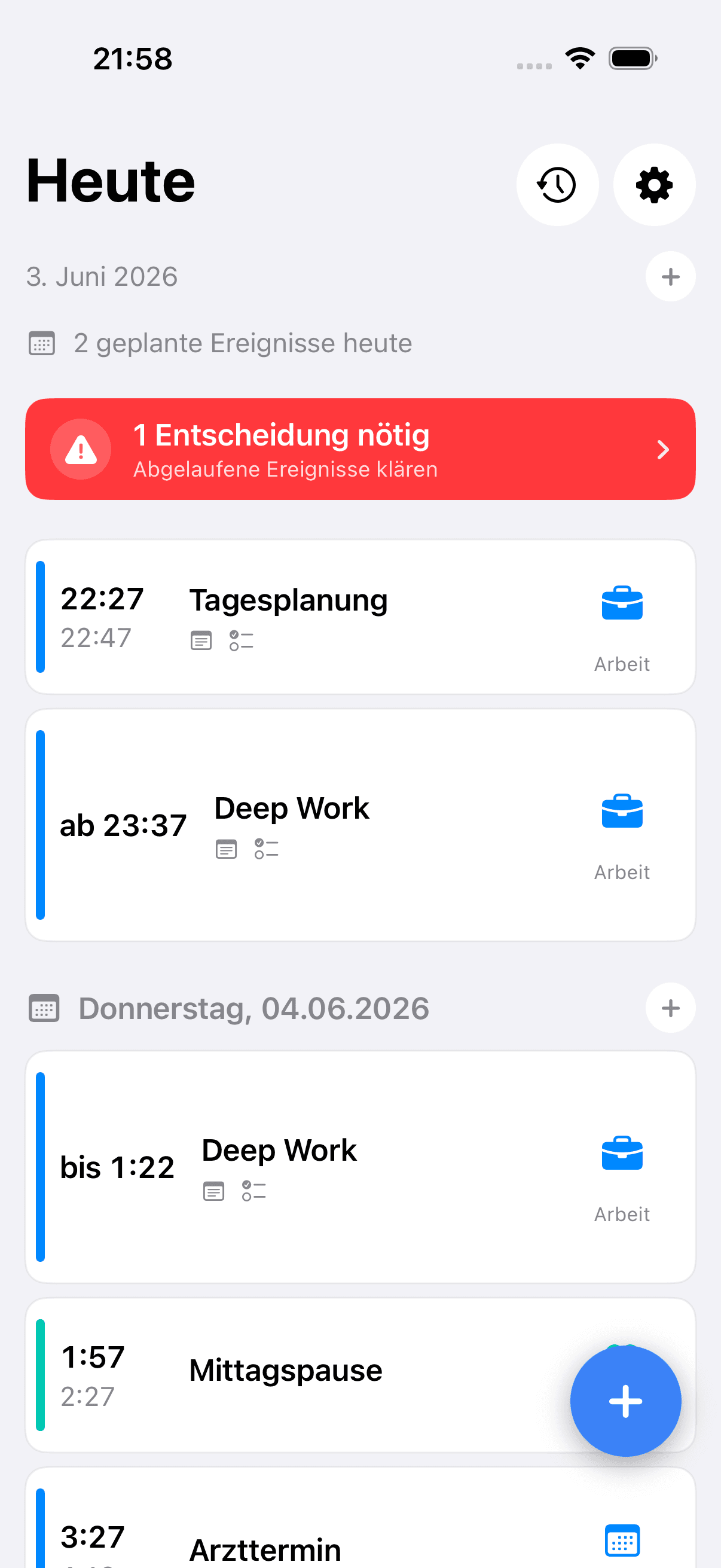
ThatsNext dashboard in light mode
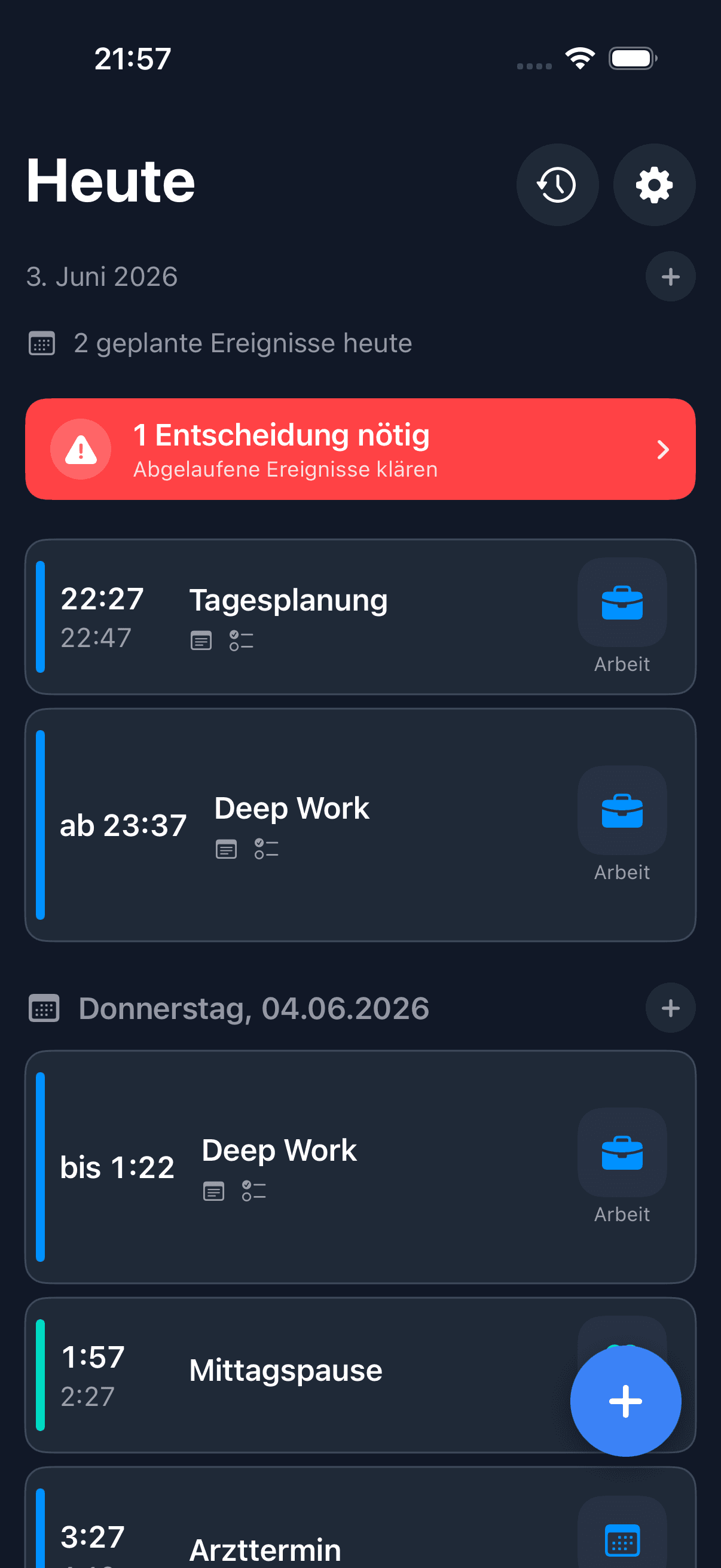
ThatsNext dashboard in dark mode

Light Mode / Dark Mode

The dashboard makes it clear what is happening now, what comes next, and which decisions still need attention.

The problem

To-do lists often show everything. But not what comes next.

Many planning apps collect tasks, deadlines, and reminders. ThatsNext takes a different view: your day is a sequence of events, not a pile of things to finish someday.

Positioning

Why ThatsNext?

A calendar is good for appointments. A to-do app is good for tasks. A reminders app is useful when you need a nudge at a specific time.

But in everyday life, the real problem is often somewhere else.

It is not just about saving an appointment, checking off a task, or getting a notification. It is about understanding your day as a sequence: What happens when? What comes before it? What comes after it? Where does something realistically fit?

That is where ThatsNext comes in.

The app does not show your day as a collection of separate lists. It turns appointments, personal tasks, routines, breaks, reminders, and optional calendar events into one visible chronological flow.

That means less pressure from open lists and more orientation for the next step.

ThatsNext does not have to replace your calendar. It also does not try to replace a full project or task management system. It closes the gap in between: it turns what matters today into a clear order.

Not: What do I have to get done someday?

But: This is what comes next.
What your day looks like

Today at a glance, without task noise.

The dashboard makes it clear what is happening now, what comes next, and which decisions still need attention.

  • Today and upcoming days in one order
  • Own events and calendar appointments together
  • Next events with time, category, and context
  • Open decisions visible instead of stuck in your head
ThatsNext dashboard showing today's event chain

Light or Dark

The same calm, matched to your system.

ThatsNext can follow your system appearance or stay exactly how you set it.

ThatsNext dashboard in light mode
Light Mode
ThatsNext dashboard in dark mode
Dark Mode
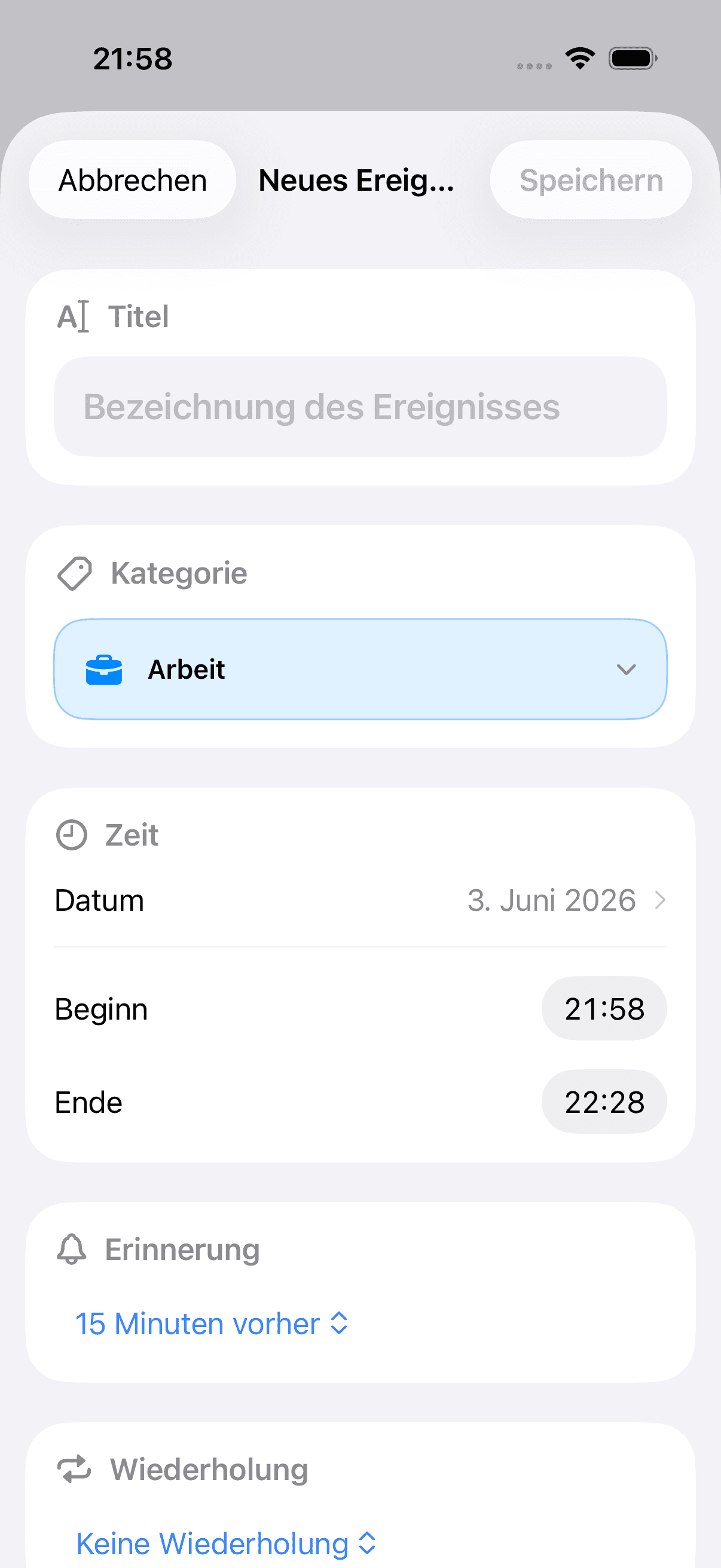
ThatsNext new event screen

From idea to event

Time, category, and details in one place.

New events can hold the details you actually need: time, category, reminder, repeat, notes, checklists, and an optional image.

  • Clear start and end times
  • Categories with color and icon
  • Reminders and repeats
  • Notes, checklists, and image when useful

Settings without chaos

Appearance, calendars, and privacy stay easy to reach.

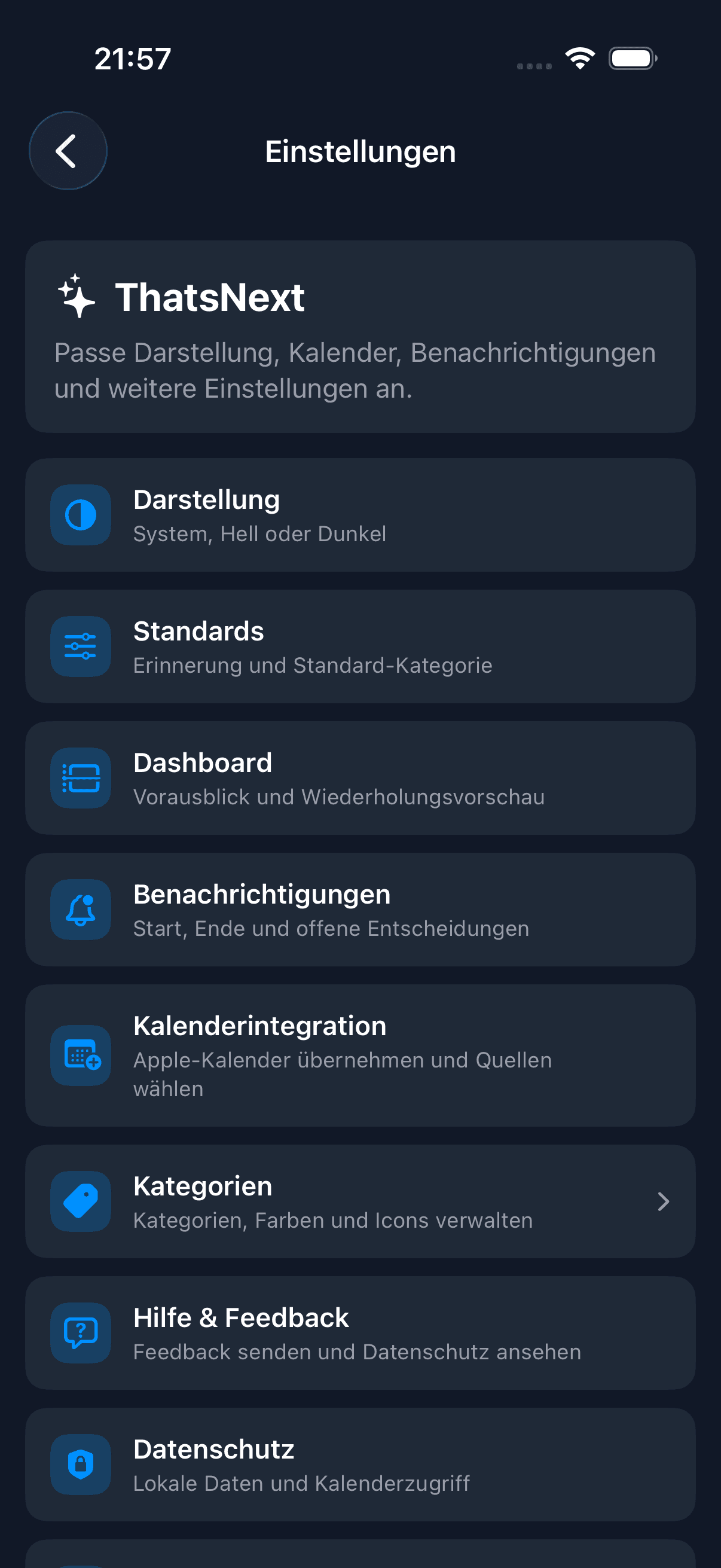
Settings bring appearance, notifications, calendar integration, categories, feedback, and privacy together without unnecessary complexity.

  • Light, Dark, or System
  • Choose calendar sources
  • Notifications for start, end, and open decisions
  • Local data and calendar access in view
ThatsNext settings screen in dark mode

The solution

What makes ThatsNext different.

Chronological event chain

Less someday, more what happens when: your day is shown in the order it unfolds.

Apple Calendar in your day flow

Selected calendar appointments sit next to your own events in one shared view.

Make open decisions visible

Decisions do not have to live in your head; they can become a visible part of your plan.

Repeat preview

Recurring events should help you see what is coming over the next few days before it surprises you.

Notice repeated cancellations

Frequently moved or cancelled events may later become gentle planning hints.

Privacy-first, no dedicated server

Local use, selected calendars, and your own iCloud in the future keep your planning private.

Planning signal

If a plan keeps failing, that is a signal.

ThatsNext should make repeatedly cancelled or moved events visible. Not as judgement, but as a friendly hint: maybe the time, duration, or rhythm does not fit your actual day.

Planned as a hint, not a judgement: no scoring, no pressure, no diagnosis.

What is planned?

Concrete features, clearly separated.

The beta is meant to test the foundation of the day flow. Some convenience features are intentionally planned for later.

Beta / foundation

  • Chronological day overview
  • Own events with time, notes, checklists, and optional image
  • Categories with colors and icons
  • Apple Calendar import for selected calendars
  • Local notifications
  • Repeat preview and open decisions
  • Light, Dark, and System appearance

Planned after beta

  • iCloud sync through your own Apple ID
  • Home Screen and Lock Screen widgets
  • Apple Watch
  • Better history and insights
  • Gentle hints for frequent moves or cancellations
  • Extended write-back to Apple Calendar
  • Shortcuts integration

Free and optional Plus

The core idea should remain usable for free.

The exact split may change before release. The intent is clear: no hard paywall around the calm day structure.

Intended to stay free

  • TestFlight beta
  • Day overview
  • Create and manage your own events
  • Categories
  • Simple reminders
  • Calendar integration
  • Light, Dark, and System appearance
  • Local use without an account

May become Plus later

  • iCloud sync across devices
  • Widgets and Apple Watch
  • Advanced insights
  • Advanced repeat and planning hints
  • Extended calendar write-back
  • Additional themes and category palettes
  • Shortcuts integration
  • Export and review features

Changes will be communicated transparently before anything changes about usage or possible upgrades.

Beta via TestFlight

Public Beta available

ThatsNext is now available as a public TestFlight beta. Help test the app and improve the first public version.

Join the TestFlight Beta

Apple's TestFlight app is required to participate.

Privacy-first

Your planning should help you, not judge you.

Your day structure stays private: local on your device and, in the future, through your own iCloud. No dedicated server, no extra account. Calendar access only uses the calendars you choose.

No AI judgement, scoring, or automatic analysis of your everyday life. You decide what matters.

Quick answers

FAQ

Is ThatsNext free?

The beta is free. Later, a free base should remain available, while extra convenience features may become optional Plus features.

How is it different from a to-do app?

ThatsNext shows a day flow with time, context, and order instead of a list of things that should be finished someday.

Are calendar details uploaded to a server?

No dedicated server is planned. Calendar access only uses selected Apple calendars, and your day structure stays local or, later, in your own iCloud.

Which features are planned?

After beta, ideas include iCloud sync, widgets, Apple Watch, history, gentler planning hints, and Shortcuts.

Does ThatsNext use AI?

No. ThatsNext is intended to work without AI judgement, scoring, or automatic analysis of your everyday life.

Support voluntarily

ThatsNext is currently free during beta. If you want to support the independent development, you can leave a voluntary contribution via Ko-fi.

This is not a purchase, not a subscription, and does not unlock any app features.

Support on Ko-fi